

Web60 Features
Automatic WordPress Malware Scanning: What It Catches, and What It Will Always Miss
Sitting at my desk first thing this morning, reviewing the previous night's scan reports across our managed WordPress sites was a five-minute job. Nothing flagged. That is what I want to see at 8am on a Tuesday.
Boring is the point.
The reason boring scan results matter is what they imply: that on the days when something is flagged, the scanner did its job. Suspicious file modifications get caught, quarantined before they execute, our operations team gets alerted, and the affected files get rolled back to their pre-modification state. The customer keeps sleeping. By the time they are drinking coffee, the threat is over.
That is what automatic malware scanning is supposed to do. The problem is that most WordPress hosts who advertise "malware scanning" do not actually do this. They run a once-a-month signature check, send no alerts, take no action, and the words on the marketing page do all the work.
So let me walk through what a proper malware scanner actually does, what it catches, what it misses, and how to tell whether your current host is running anything beyond a screensaver.
What hosts actually mean by "malware scanning"
The phrase has been watered down to the point of being almost meaningless. I have seen "malware scanning included" used to describe four very different things:
- A monthly scan of public-facing pages against a generic blocklist
- A WordPress plugin set up by default but never configured or monitored
- A nightly cron that runs an antivirus binary against the document root and silently logs the output
- A real-time intrusion detection system with quarantine, alerting, and incident response
These are not the same thing. The first three are theatre. The fourth is what the phrase used to mean before marketing departments got hold of it.
For a small business owner, the practical question is not whether scanning happens. The practical question is what happens when something is found. If the answer is "I get an email in three days, by which time the SEO has been gutted and Google has flagged my domain", scanning was never the value. The response was. As Sucuri has documented in successive hacked website threat reports, infections often run quietly for days or weeks before the site owner notices, and the most damaging ones are specifically designed to stay invisible to the person running the site.
A scanner that does not act on what it finds is not security. It is a logbook.
The four detection methods a proper scanner uses
Modern WordPress malware scanning is not one thing. It is four overlapping methods, each catching threats the others miss.
Signature-based scanning. The scanner compares file contents and database entries against a maintained database of known malicious patterns: base64-encoded payloads, suspicious code-execution constructs, known malicious redirect snippets, and similar fingerprints. As Melapress's security glossary correctly puts it, signature matching is fast and catches known commodity threats, but is largely useless against anything novel. And novel is most of what attackers actually deploy.
Heuristic analysis. Instead of looking for a specific signature, the scanner looks for behaviour patterns associated with malicious code. PHP files that contain user-creation calls outside expected admin contexts. Theme files that suddenly contain obfuscated base64 strings. New scripts injected into header.php between scans. This is what catches the obfuscated and encoded threats designed to slip past signature scanners. Heuristics generate more false positives, which is why they need an operations team to triage rather than firing off a dozen unread alerts a week.
File integrity monitoring. The scanner keeps a cryptographic hash of every WordPress core file, every theme file, and every plugin file. When a hash changes unexpectedly, the scanner flags it. This is the method that catches attackers planting a backdoor inside wp-includes after exploiting a plugin vulnerability. A modified file in the WordPress core directory is almost always bad news. A scanner without file integrity checks will miss it entirely.
Behavioural and database checks. A growing class of WordPress malware lives in the database, not the filesystem. Spam links injected into post content. Malicious widgets. Hijacked user accounts with administrator privileges. Scheduled tasks calling out to suspicious URLs. The scanner needs to inspect database content as well as files, or the site can be silently infected with nothing showing up in the filesystem scan.
A scanner running only the first of these methods catches a fraction of what is actually out there. The four together, integrated with an operations team that acts on them, is the only honest definition of "automatic malware scanning" worth paying for.

How WordPress sites actually get compromised
The threat landscape has been documented year after year by the major WordPress security vendors, and the pattern is depressingly stable.
According to Patchstack's State of WordPress Security report, 7,966 new vulnerabilities were disclosed across the WordPress ecosystem in 2024 alone. That is a 34% increase on 2023. The bulk of those were in plugins, not in WordPress core. WordPress core itself accounted for a single disclosed vulnerability that year. The ecosystem around WordPress, the plugins and themes installed by the site owner, is where almost all of the risk lives.
Wordfence's 2024 annual report adds another data point. Their network blocked over a billion SQL injection attempts during the year, and roughly 35% of vulnerabilities disclosed in 2024 still remained unpatched several months into 2025. Those are not edge cases. They are the everyday reality of the WordPress threat surface.
Sucuri's 2024 mid-year SiteCheck data tells the same story from a different angle. Of the 53 million sites scanned in the first half of 2024, around 681,000 were found infected. By Sucuri's count, somewhere around 9 in 10 of the infected CMS-based sites they cleaned were running WordPress, though that proportion partly reflects WordPress's roughly 60% share of the CMS market, as W3Techs continues to report.
The takeaway is not that WordPress is unsafe. It is that the WordPress ecosystem is large, the attack surface is mostly third-party code, and a business owner installing five plugins is unknowingly exposing themselves to whichever of those plugins has the next disclosed CVE.
Scanning is what catches the consequence when something inevitably slips through.
What happens when a scanner finds something
This is the part of the marketing page that most hosts skip. "We scan for malware" sounds good. The honest sentence is "we scan for malware, and when we find something, we do X."
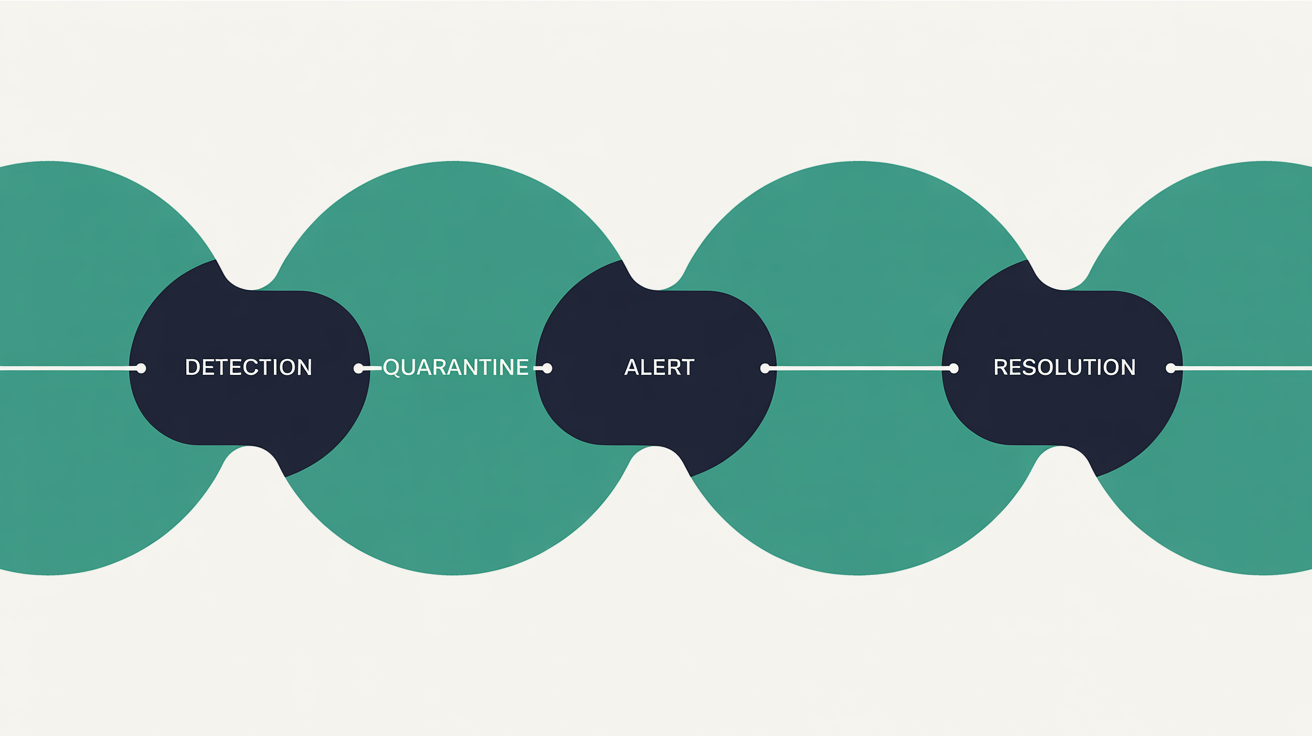
A proper response chain looks like this. Detection happens automatically, ideally several times a day. The suspicious file or database entry is quarantined into an isolated location, not left in place to keep executing. An alert fires to a real operations team, not just a logged event nobody reads. The team verifies the finding, rolls back the affected file from the pre-modification snapshot, and confirms the site is clean.
In practice, that means a site owner who would otherwise have spent a Friday evening on the phone to a "WordPress fix-it specialist" charging in the high hundreds of euro instead receives a notification the next morning saying an issue was found and resolved overnight. The difference is hours, not days, between detection and resolution, and zero downtime in most cases.
The picture without that operations chain is grim, and it is not hypothetical. A scanner with no alerting silently catalogues the infection. A scanner with no quarantine leaves the payload in place. A scanner with no remediation pathway leaves the owner to figure out the next steps. Picture a Waterford retailer discovering on Monday morning that Google has flagged their domain because a malicious redirect was injected on Friday, no alert was sent, and the monthly scan had not been due to run for another week. That sequence is the standard outcome for a site running on cheap shared hosting with a scanner that has nobody behind it.
What a proper malware scanning approach looks like
Putting the criteria together, the standard a serious managed WordPress host should meet has four components.
Continuous or near-continuous scanning, not a monthly cron job. The window between an infection and detection should be measured in hours, not weeks.
All four detection methods running together. Signature matching catches commodity threats. Heuristics catch novel obfuscation. Integrity checks catch core file modification. Database checks catch in-database payloads. Anything less is partial coverage.
Automatic quarantine and rollback, integrated with the host's backup system. Pre-modification snapshots taken before any file change make rollback a one-step operation rather than an excavation.
A real operations team that triages alerts, verifies findings, and resolves issues without waiting for the customer to file a ticket. The customer's first knowledge of the incident should be a "we caught this, we resolved this, here is what happened" notification, not a panicked discovery on a Monday morning that Google has flagged the site.
This is the standard Web60's Irish-hosted infrastructure was built around. The platform runs server-level automatic malware scanning across all sites, integrates with the nightly automatic backup snapshots so any flagged file can be rolled back to its last known clean state, and routes alerts through an operations team rather than into an automated email that vanishes into a customer's spam folder. The €60-a-year all-inclusive plan covers all of this, with no extra "security add-on" tier and no per-scan billing.
The honest concession on this is the one I always give. If you are running a high-value WooCommerce operation turning over seven figures a year, with a dedicated DevOps team and a SOC analyst on payroll, you might genuinely want a premium security platform with custom WAF rules, full SIEM integration, and per-endpoint policy enforcement. That workload genuinely benefits from enterprise security tooling at enterprise prices. But that is not most business sites. Paying €200 a month for security features designed for retail chains is overkill for the average local firm with a Contact form and a brochure site. The standard above is what a normal business actually needs.
The honest limits: what scanning will never catch
This is the part competing marketing pages will never tell you. Automatic malware scanning is a powerful layer, but it has clear and known limits.
A scanner will not catch stolen admin credentials. If an attacker phishes the site owner and logs in with valid credentials, every action they take looks legitimate to the scanner. The scanner sees a plugin install, sees a published post, sees a new user added with administrator role. Each is a valid action by an authenticated admin. Two-factor authentication, strong password policies, and limited admin accounts are what catch that path. Scanning is not.
A scanner will not catch a malicious plugin installed before the site owner switched hosts. If the previous host never scanned, the backdoor that has been sitting there for six months is part of the site you migrated. A scanner can find the file if it matches a signature or trips a heuristic, but a sufficiently customised payload can stay dormant for months. A clean rebuild or a verified migration audit is the only way to be sure.
A scanner will not catch social engineering. A staff member emailed by a "supplier" who attaches a malicious file is a human error, not a file-system anomaly. Security training matters as much as any technical control.
A scanner will not catch supply chain attacks before they become public. If a popular plugin's update server is compromised and a malicious update goes out before researchers report it, the scanner does not yet have a signature. Heuristics may catch unusual behaviour, but a sophisticated supply chain attack can avoid that until disclosure. This is genuinely rare, but pretending it cannot happen is dishonest.
Knowing these limits is what separates a security posture from a marketing claim. Layered defence, scanning plus authentication controls plus monitoring plus operator vigilance, is the actual answer. No single tool, including ours, is the answer on its own. The pillar WordPress security and backup guide for Irish websites walks through the surrounding layers in detail.
How to verify your current host actually scans
If you are reading this and not sure where your current host stands, here are five questions worth asking them. The answers are diagnostic.
How often does the scanner run? "Once a month" is theatre. "Continuously" or "several times an hour" is real. "On request" means there is no scanner.
What detection methods does it use? If they cannot list signature, heuristic, integrity, and database, they are running one method and calling it security.
What happens when something is found? "We email you" is not a response chain. "We quarantine the file, alert our operations team, and roll back to the last clean state from our snapshot system" is. If they hesitate or transfer you to a "manager", you have your answer.
Is there a real operations team behind it? This is the question most providers cannot answer honestly. "Yes, we have an operations team monitoring continuously" should be backed up by named processes. If support is offshore and answers from a script, the operations team is a wishlist at best.
Is scanning included or an upsell? A managed host charging an extra €15 a month for "advanced security" is admitting that the standard plan does not include real scanning. With the everything-included €60-a-year value Web60 was built around, security is not a tier. It is the baseline.
I made the mistake once, years ago, of trusting a security plugin's clean dashboard for an audit. Turned out the scheduled scan had silently broken five weeks earlier and nobody had checked the schedule. A scanner that reports nothing wrong is meaningless until you verify it actually ran. The same principle applies to any host you are paying for security.
For the wider picture of what runs automatically while your site is live, the automated layers behind properly managed WordPress explains what good infrastructure handles without anyone touching the keyboard.
Conclusion
A malware scan, on its own, is just a logbook. What actually protects a WordPress site is the chain that runs from scan to alert to quarantine to rollback, executed by people who notice the problem before the site owner does. That chain is either there or it is not, and the marketing page rarely tells you which.
If you do not currently know what your host does on the night a scanner flags something, that is information worth surfacing. The five questions above are where to start.
Frequently Asked Questions
Does Web60 include automatic malware scanning at no extra cost?
Yes. Continuous malware scanning is part of every Web60 plan and is included in the €60-a-year all-inclusive price. There is no security tier, no scanning add-on, and no per-incident billing.
How often does Web60 scan a site for malware?
Scanning runs automatically at the server level on a frequent cadence, with file integrity checks and database checks running on top throughout the day. The detection window is hours rather than the weeks that come with monthly cron-based scans.
What happens if a Web60 scanner finds an infection on my site?
The flagged file or database entry is quarantined automatically. The operations team verifies the finding, rolls back the affected file using the pre-modification snapshot, and confirms the site is clean. The site owner is notified with a summary of what was caught and what action was taken.
Can a malware scanner give me a false sense of security?
It can if you assume scanning is the only defence. Scanning catches the consequence of compromise. It does not catch stolen credentials, weak passwords, or social engineering. Layered defence, including two-factor authentication where your hosting panel offers it, careful plugin choices, and staff awareness, is the full answer.
Why are most WordPress malware infections in plugins rather than core?
WordPress core is maintained by a small, focused team with a strong security record. Plugins are written by tens of thousands of independent developers with widely varying security practices. According to Patchstack, only one disclosed vulnerability in 2024 was in WordPress core. The other 7,965 were in the surrounding ecosystem.
What is the difference between malware scanning and a firewall?
A firewall tries to block attacks before they reach the site. A malware scanner detects compromise after it happens. Both are needed. The firewall reduces the volume of attempts that reach your application, and the scanner is the catch-net for what the firewall misses.
Can I run my own malware scanner plugin instead of relying on the host?
You can, and it adds a useful layer. The drawback is that a plugin running inside WordPress is subject to the same compromise it is trying to detect. Server-level scanning runs outside the WordPress process and is much harder for an attacker who has compromised the application to disable. The two together are better than either alone.
Sources
State of WordPress Security 2025, Patchstack
2024 Annual WordPress Security Report, Wordfence
SiteCheck Malware Trends Report 2024, Sucuri

Graeme Conkie founded SmartHost in 2020 and has spent years building hosting infrastructure for Irish businesses. He created Web60 after seeing the same problem repeatedly — Irish SMEs paying too much for hosting that underdelivers. He writes about WordPress infrastructure, server security, developer workflows, managed hosting strategy, and the real cost of hosting decisions for Irish business owners.
More by Graeme Conkie →Ready to get your business online?
Describe your business. AI builds your website in 60 seconds.
Build My Website Free →More from the blog
WordPress Admin Email: Who Gets the Message When Your Site Breaks?
Your WordPress admin email gets crash alerts, failed update notices and privacy requests. If it still points to whoever built your site, take it back today.
Photos Won't Upload to Your Website? What the Error Is Telling You
Photos won't upload to your website? What each WordPress upload error means, why iPhone HEIC photos fail, and the quick fixes that get your pictures online.