

Infrastructure
Stop Wasting Time in WordPress Admin: Simple Management for Busy Business Owners

If you're still logging into wp-admin to update plugins, you're doing WordPress wrong. Every week, thousands of Irish business owners waste hours clicking through WordPress dashboards, manually updating plugins, checking for security patches, and praying nothing breaks. Meanwhile, their competitors are focusing on what actually grows businesses: serving customers, developing products, building relationships. The gap between businesses that treat WordPress as a tool and those who treat it as a chore is widening fast.
Why WordPress Admin is Killing Your Productivity
WordPress maintenance isn't just time-consuming, it's actively dangerous when done manually. Picture this scenario, which happens more often than you'd think. A Dublin bistro owner logs into WordPress at 4pm on Friday to update a booking plugin. The update breaks the reservation system. By the time they notice, twenty-seven weekend bookings have bounced to voicemail. That's not hypothetical productivity loss. That's real revenue walking out the door.
The mathematics are brutal. According to research from Odd Jar, WordPress site owners lose an average of 15 hours per week on repetitive tasks like manual updates and routine maintenance. For a business owner billing €75 per hour, that's €1,125 worth of productive time lost every week to administrative tasks that should run automatically.
But time isn't the only cost. Manual updates introduce human error at the worst possible moments. Updates get postponed when business is busy. Security patches sit uninstalled for weeks. Plugin conflicts go unnoticed until customers report broken functionality. This creates a cascade of problems that compound over time.
The Patchstack State of WordPress Security report reveals why manual maintenance is fundamentally flawed: 7,966 new security vulnerabilities were discovered in the WordPress ecosystem in 2024 alone. That's 22 new vulnerabilities per day. No business owner can keep pace with that manually. Yet 96% of these vulnerabilities were in plugins, exactly the components most business owners update haphazardly.
The Hidden Costs of Manual WordPress Maintenance
Most Irish business owners see WordPress maintenance as "free" because they do it themselves. This is accounting fiction. Your time has value, and manual maintenance extracts that value in ways that don't appear on any invoice.
Consider a typical maintenance session for a Cork retailer with a WooCommerce shop. Login to wp-admin. Check for plugin updates. Update WooCommerce. Test the checkout process. Update security plugins. Check for theme updates. Test the site on mobile. Verify SSL certificate status. Review backup logs. Update WordPress core if available. Test critical functionality again.
That's 45 minutes if nothing goes wrong. When something does break, and statistical models suggest this happens roughly once every seven maintenance sessions, you're looking at emergency troubleshooting time, potential developer fees, and lost revenue while the site is compromised.
The opportunity cost multiplies when you consider frequency. WordPress recommends checking for updates weekly, though many security experts suggest daily monitoring for high-risk sites. Even conservative monthly maintenance represents 9 hours per year of work that generates zero business value.
Worst of all, manual maintenance encourages dangerous shortcuts. Updates get bundled together to save time, making it impossible to identify which specific change caused a problem. Testing gets abbreviated when business is busy. Staging environments get skipped entirely because they require separate setup and maintenance.
Businesses using WordPress automation report reducing administrative work by up to 80%, according to the same Odd Jar research. That time can be redirected toward activities that actually grow the business: customer service, product development, marketing strategy, or simply taking an afternoon off.
Web60's Unified Management Dashboard: Everything in One Place
Web60 eliminates the complexity of traditional WordPress maintenance through a unified management dashboard that handles everything from a single interface. Instead of logging into wp-admin, checking hosting control panels, monitoring security plugins, and juggling backup services, you get one comprehensive view of your site's health and performance.
The dashboard presents WordPress maintenance as business intelligence, not technical busy work. You see plugin status, security updates, backup verification, and performance metrics on one screen. More importantly, you see the business impact: which updates affect critical functionality, which security patches require immediate attention, and which performance optimisations will improve customer experience.
This approach recognises a fundamental truth about Irish SMEs: the person responsible for the website is rarely a WordPress expert. They're a business owner, marketing manager, or office administrator who needs clear information and reliable automation. Web60's dashboard speaks their language: "Your booking system is secure and up to date" rather than "WP Booking Calendar v3.2.1 applied security patch CVE-2024-xxxx".
The unified approach eliminates the cognitive overhead of managing multiple systems. No more remembering which plugins are installed, when they were last updated, or whether the backup service is still working. The dashboard maintains a complete audit trail of all changes, so you always know what happened and when.
For businesses managing multiple WordPress sites, common with franchise operations, multi-location services, or digital agencies, the unified dashboard scales horizontally. Manage five restaurant locations or twenty client sites from the same interface, with site-specific controls and consolidated reporting.
How to Update Plugins and Themes Without Touching WordPress
Automated plugin updates represent the biggest productivity gain in modern WordPress management, but most business owners avoid them because of horror stories about broken sites and emergency fixes. Web60's approach solves this through intelligent automation with safety nets.
Every plugin update on Web60 follows a consistent workflow. First, the system creates a complete backup of the current site state. Then it creates a staging environment copy where the update is tested automatically. The system checks for fatal errors, plugin conflicts, and basic functionality. Only after passing these automated tests does the update deploy to the live site.
This eliminates the Friday afternoon panic scenario entirely. If a plugin update causes problems in staging, it never reaches your live site. If an update somehow causes issues in production, which happens rarely but does happen, you can rollback to the pre-update backup in seconds.
The system handles update scheduling intelligently. Security patches deploy immediately after testing. Feature updates can be scheduled for off-peak hours. Major updates that might affect site appearance or functionality can be held for manual approval, giving you control over customer-facing changes while automating the security-critical maintenance.
Theme updates follow a similar pattern but with additional checks for customisation conflicts. Since many Irish businesses customise their WordPress themes, Web60's system verifies that custom CSS, child theme modifications, and local customisations remain intact after theme updates. You can see what Web60 includes to see what this means in practice. You can see what Web60 includes to see what this means in practice.
For plugins that require manual configuration after updates, payment gateways, booking systems, or integration tools, the system generates clear notifications about what needs attention, with links directly to the relevant settings pages.
Automated Security Updates That Actually Work
Security automation is where manual WordPress maintenance becomes genuinely dangerous. The Patchstack research shows that 11.6% of WordPress vulnerabilities in 2024 received high priority scores, meaning they're actively being exploited or expected to be exploited soon. Waiting for convenient maintenance windows means running known vulnerabilities in production.
Web60's security update system operates on different logic than standard plugin updates. When a security patch is released for any installed plugin, theme, or WordPress core, the system evaluates the risk level and deployment strategy automatically. High-priority security updates deploy immediately after minimal testing. Lower-priority patches follow the standard staging workflow.
This creates a security-first maintenance approach that doesn't compromise site stability. Critical security patches get deployed within hours of release. Feature updates and minor improvements follow the careful testing process. The system maintains detailed logs of all security actions, so you have full visibility into what happened and why.
The automated security system integrates with Web60's server-level security hardening. File integrity monitoring detects unauthorised changes. Fail2ban blocks brute force attacks automatically. Malware scanning runs continuously in the background, not just during maintenance windows.
For Irish businesses subject to GDPR, the security automation provides crucial compliance support. Data breach notifications are required within 72 hours under GDPR. Automated security patching reduces the likelihood of preventable breaches that trigger notification requirements.
I recommended manual security updates to clients for years before realising the human factor was the weakest link. A Galway accountancy firm postponed a WooCommerce security update for three weeks because they were busy with year-end accounts. The vulnerability got exploited before they applied the patch. Automated security updates eliminate this entirely.
Managing Multiple WordPress Sites from One Dashboard
Multi-site management is where manual WordPress maintenance becomes completely unscalable. A digital agency managing twenty client sites can spend entire days just checking for updates and applying patches. A franchise operation with ten locations faces the same multiplication problem.
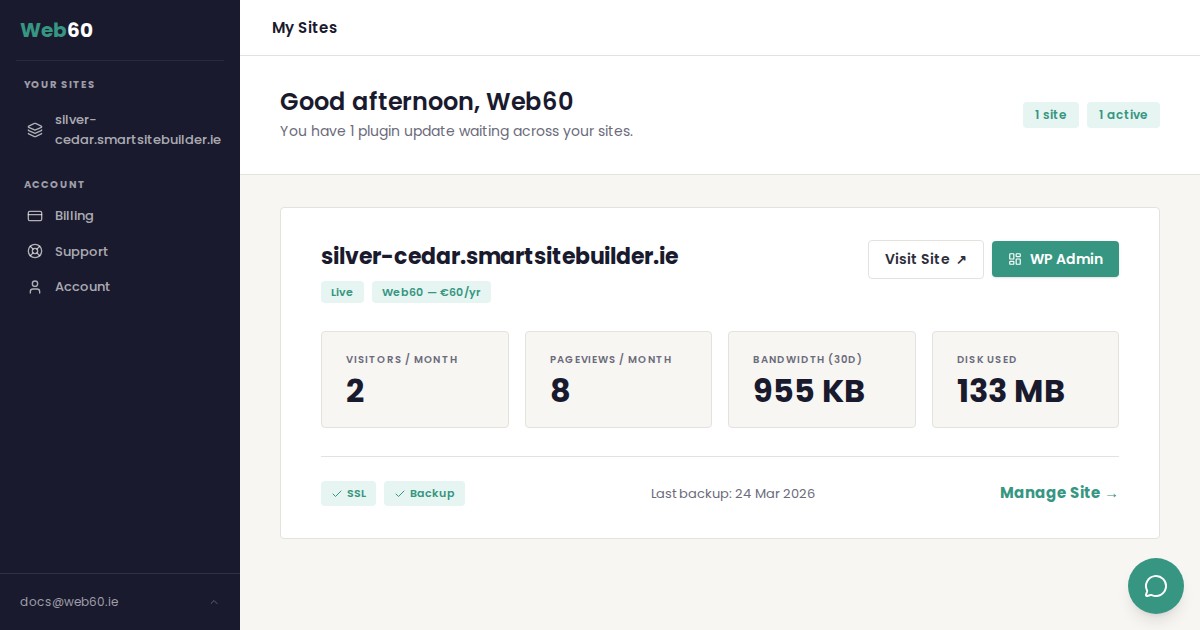
Web60's multi-site dashboard aggregates maintenance tasks across all managed sites. Instead of logging into twenty separate WordPress installations, you see a consolidated view of update status, security alerts, and performance metrics. Updates can be deployed to multiple sites simultaneously or scheduled in sequences that prevent resource conflicts.
The multi-site approach recognises that different sites have different maintenance requirements. A corporate brochure site needs security updates but can tolerate longer testing cycles for feature updates. An eCommerce site needs rapid deployment of payment security patches but requires careful testing of inventory management updates. The dashboard lets you configure site-specific update policies from one interface.
Bulk operations become practical with proper automation. Apply security updates to all sites immediately. Deploy a new booking plugin to all franchise locations with one click. Update contact information across multiple sites when business details change.
For agencies charging clients for maintenance services, the multi-site dashboard provides detailed reporting on maintenance activities. Clients see exactly what work was performed, when updates were applied, and what security measures were taken. This transparency builds trust and justifies maintenance fees.
The consolidated approach also reveals patterns across sites. If one site experiences problems with a specific plugin update, you can hold that update on other sites until the issue is resolved. This collective intelligence prevents the same problem from affecting multiple clients or locations.
Setting Up Automated Backups Before Updates
Backup automation is the foundation that makes everything else possible. Without reliable backups, automated updates become too risky. With proper backup systems, update automation becomes the safest way to maintain WordPress sites.
Web60 creates three types of backups automatically: nightly full-site backups, pre-update snapshots, and manual on-demand backups. The nightly backups provide general disaster recovery. Pre-update snapshots create restore points immediately before any change is applied. On-demand backups let you create safe checkpoints before making custom changes.
The backup system includes verification testing that many hosting providers skip entirely. After every backup creation, the system performs integrity checks to verify that backup files are complete and uncorrupted. This prevents the nightmare scenario of discovering backup corruption during an emergency restore.
Backup retention follows a grandfather-father-son rotation that balances storage efficiency with recovery options. Daily backups are kept for one month. Weekly backups are retained for three months. Monthly backups are stored for one year. This provides multiple recovery points without consuming excessive storage.
Restoration is designed for business owners, not system administrators. Instead of technical restoration procedures involving databases and file uploads, Web60 provides one-click restoration to any backup point. The system handles database restoration, file replacement, and configuration updates automatically.
For Irish businesses with GDPR obligations, the backup system includes data sovereignty protections. All backups remain stored within Ireland on SmartHost's sovereign Irish cloud infrastructure. This eliminates concerns about personal data being transmitted to international jurisdictions during backup operations.
Monitoring Plugin Conflicts and Performance Impact
Plugin conflicts represent the most unpredictable aspect of WordPress maintenance. Two plugins that work perfectly in isolation can interfere with each other after updates, creating problems that don't appear until customers encounter specific workflows or content combinations.
Web60's monitoring system tracks plugin performance and interaction patterns continuously, not just during maintenance windows. The system maintains baselines for page load times, memory usage, and database query performance. When plugin updates affect these metrics, administrators receive specific alerts about performance degradation. For related reading, see our guide on Green WordPress Hosting: How Carbon-Neutral Infrastructure Cuts Energy Costs by 23%. For related reading, see our guide on Green WordPress Hosting: How Carbon-Neutral Infrastructure Cuts Energy Costs by 23%.
Conflict detection goes beyond basic error logging. The system monitors for subtle integration problems: booking forms that load slowly, payment gateways that timeout intermittently, or contact forms that fail silently. These problems often escape manual testing but create significant customer experience problems.
Performance monitoring includes Core Web Vitals tracking, which directly affects Google search rankings. The system alerts administrators when plugin updates impact Largest Contentful Paint, Cumulative Layout Shift, or First Input Delay metrics. This prevents SEO damage from poorly-optimised plugin updates.
For eCommerce sites, the monitoring system pays special attention to checkout processes, payment gateway functionality, and inventory management. These are the areas where plugin conflicts cause immediate revenue loss. The system can automatically disable problematic plugins and send immediate alerts when critical eCommerce functionality is affected.
The monitoring data feeds back into update automation decisions. If a plugin consistently causes performance problems after updates, the system can flag future updates from that plugin for manual review rather than automatic deployment.
When to Override Automatic Updates (And When Not To)
Automation works best when it includes intelligent override mechanisms. Certain WordPress updates require manual consideration because they affect business-critical functionality or customer-facing features that automated testing cannot fully evaluate.
Major WordPress core updates, new versions like 6.5 to 6.6, should follow manual approval workflows. These updates often introduce new features, change administrative interfaces, or modify how themes and plugins interact. While the security patches within these updates are crucial, the deployment timing should align with business planning.
Custom plugin updates require manual review when they affect integrations with external services. Payment gateway updates, CRM connectors, and email marketing integrations can break in ways that automated testing cannot detect. These require verification with the actual external services, not just local functionality testing.
Theme updates should be held for manual approval when they affect sites with significant custom CSS or child theme modifications. Automated testing can verify that the site loads and basic functions work, but cannot evaluate whether the visual appearance matches brand requirements or whether custom layouts remain intact.
However, security updates should never be delayed for convenience. When a security patch is available for any installed plugin, theme, or WordPress core, deploy it immediately through automated systems. The risk of exploitation always outweighs the inconvenience of potential functionality issues.
The override system should include clear escalation procedures. When automatic updates are held for manual review, set specific deadlines for that review. Security updates held longer than 48 hours should trigger alerts. Feature updates held longer than two weeks should be automatically approved or permanently disabled.
For businesses that lack technical expertise to make these override decisions, Web60's Irish-based support team can provide guidance on which updates require manual consideration and which can be safely automated.
The Dead Simple WordPress Management Workflow
Here's how proper WordPress management works when automation handles the complexity:
1. Configure once, manage forever. Set up your update policies, backup retention, and monitoring preferences during initial setup. The system remembers these preferences and applies them consistently without requiring repeated configuration.
2. Review weekly reports, not daily dashboards. Instead of logging into WordPress admin every day, review automated weekly reports that summarise what updates were applied, what security actions were taken, and whether any issues require attention.
3. Respond to alerts, don't hunt for problems. Let the monitoring system notify you when something needs attention, rather than manually checking for issues. This shifts you from reactive troubleshooting to proactive problem resolution.
4. Test major changes in staging, trust automation for routine updates. Use staging environments for content changes, design modifications, or new plugin installations. Let automation handle security patches and minor updates that don't affect customer-facing functionality.
5. Verify backups monthly, not after disasters. Schedule regular backup verification tests to ensure restoration procedures work correctly. This prevents backup failures from being discovered during actual emergencies.
This workflow transforms WordPress management from a weekly administrative burden into a monthly oversight responsibility. You spend time on business decisions, what features to add, what content to publish, what integrations to implement, rather than technical maintenance tasks.
To see how this works in practice, explore Web60's unified management dashboard. For further context, see how to update your WordPress site safely. For further context, see staging environments for Irish businesses.
Conclusion
WordPress management doesn't have to consume hours every week that could be spent growing your business. Web60's unified dashboard and intelligent automation eliminate the manual complexity that keeps Irish business owners trapped in wp-admin instead of focusing on customers and revenue. The technology exists to handle updates, security patches, and backups automatically while maintaining the safety nets that prevent disasters. The question isn't whether automation works, it's whether you're ready to stop doing manually what machines can do better. Your competitors who have already made this transition aren't spending Friday afternoons updating plugins. They're planning next quarter's growth strategy.
Frequently Asked Questions
Is it safe to let WordPress updates run automatically?
Automatic WordPress updates are safer than manual updates when implemented with proper testing and backup systems. Web60 creates staging environments where updates are tested before deployment, takes automatic backups before any changes, and includes rollback capabilities if issues occur. This eliminates the human error factor that causes most WordPress maintenance disasters.
How much time does WordPress management actually take for Irish businesses?
Research indicates WordPress site owners lose an average of 15 hours per week on repetitive maintenance tasks like manual updates and routine security checks. For Irish SMEs, this represents significant opportunity cost that could be redirected toward customer service, business development, or strategic planning activities that generate revenue.
What happens if an automatic update breaks my website?
Web60's automatic update system includes multiple safety nets: pre-update backups, staging environment testing, and one-click rollback capabilities. If an update causes problems, you can restore to the previous working version in seconds. The system also monitors for conflicts and performance issues, alerting you immediately if problems are detected.
Can I still control what happens to my WordPress site with automation?
Yes, automation should enhance control, not eliminate it. Web60 lets you configure update policies, approve major changes, and override automatic decisions when needed. You maintain full control over business-critical decisions while delegating routine maintenance tasks to automated systems that work more consistently than manual processes.
How does automated WordPress management work with GDPR compliance?
Automated WordPress management actually improves GDPR compliance by ensuring security updates are applied consistently and quickly. Web60's Irish-based infrastructure keeps all data within Ireland, automated security patching reduces breach risks, and detailed audit logs provide the documentation required for GDPR compliance reporting. You might also find our article on What Actually Makes a WordPress Site Fast: The Performance Stack Behind Every Page Load useful. You might also find our article on How to Migrate Your Website to Web60: A Complete Step-by-Step Guide useful.
What's the difference between Web60 and basic WordPress hosting for management?
Basic WordPress hosting gives you a WordPress installation that you must maintain yourself. Web60 provides managed WordPress hosting with automated updates, security monitoring, backup verification, staging environments, and unified dashboard management. The difference is between DIY maintenance and professional management services.
Sources
Patchstack State of WordPress Security 2025: https://patchstack.com/whitepaper/state-of-wordpress-security-in-2025/
Odd Jar WordPress Workflow Automation Guide 2025: https://oddjar.com/wordpress-workflow-automation-2025-complete-plugin-comparison-roi-guide/
Central Statistics Office Ireland Business Statistics 2022: https://www.cso.ie/en/releasesandpublications/ep/p-biisr/businessinireland2022summaryresults/mainresults/

Graeme Conkie founded SmartHost in 2020 and has spent years building hosting infrastructure for Irish businesses. He created Web60 after seeing the same problem repeatedly — Irish SMEs paying too much for hosting that underdelivers. He writes about WordPress infrastructure, server security, developer workflows, managed hosting strategy, and the real cost of hosting decisions for Irish business owners.
More by Graeme Conkie →Ready to get your business online?
Describe your business. AI builds your website in 60 seconds.
Build My Website Free →More from the blog
WordPress Closed That Plugin. Your Dashboard Still Says It Is Fine.
WordPress can close a plugin without telling you. Updates stop, the code keeps running, and your admin screen shows nothing. How to check your own list.
The NIS2 Supplier Questionnaire: A Law Ireland Has Not Passed Is Already on Your Desk
Your customer must vet its suppliers under NIS2, even though Ireland has not passed the law yet. What the form really asks, and how to answer it credibly.