

Your Web60 dashboard includes a built-in security scanner that checks your WordPress site against a set of recommended hardening measures. The scanner lives inside the Security card on the Advanced Settings page and gives you a clear view of what is protected and what still needs attention.
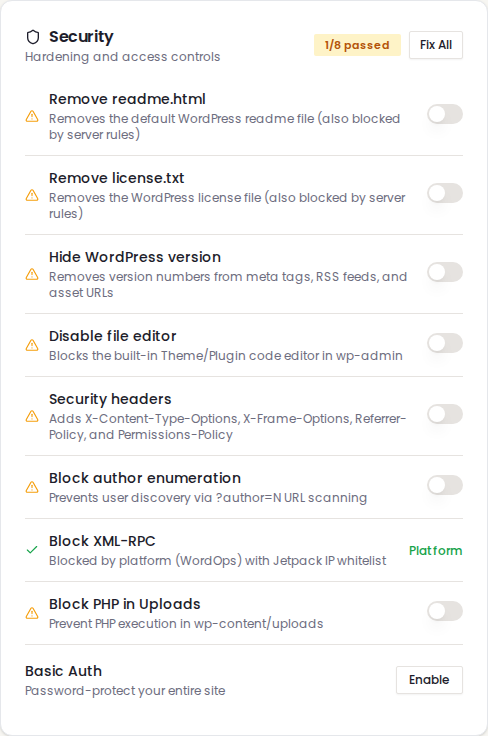
What the scanner checks
The Security card monitors eight items in total:
| Item | What it does |
|---|---|
| Remove readme.html | Deletes the default WordPress readme file from your webroot |
| Remove license.txt | Deletes the WordPress license file from your webroot |
| Hide WordPress version | Strips version numbers from meta tags, RSS feeds, and asset URLs |
| Disable file editor | Blocks the built-in code editor in wp-admin |
| Security headers | Adds protective HTTP headers to every response |
| Block author enumeration | Prevents username discovery via URL scanning |
| Block XML-RPC | Blocks the legacy remote access method |
| Block PHP in Uploads | Prevents code execution in your media folder |
Each item shows a green tick when enabled or an amber warning when it needs attention.
How to use it
- Log in to your Web60 dashboard and select your website.
- Click Advanced Settings in the sidebar.
- Find the Security card. The badge in the top-right corner shows how many items are passing (for example, 6/8 passed).
- Toggle individual items on or off, or click Fix All to enable everything at once.
The Fix All button
If any items are not yet enabled, a Fix All button appears in the card header. Clicking it applies all recommended settings in a single action. Items that are already enabled are left unchanged.
Once all items pass, the badge turns green and the Fix All button disappears.
Understanding each setting
Each security item has its own detailed guide:
- Remove default WordPress files - readme.html and license.txt
- Hide your WordPress version - meta tags, RSS, and asset URLs
- Disable the WordPress file editor - DISALLOW_FILE_EDIT
- Add security headers to your website - HTTP response headers
- Block author enumeration - ?author=N scanning
- Block XML-RPC - legacy remote access
- Block PHP in Uploads - uploads folder protection
Need help?
If you have questions about any security setting or need advice on protecting your site, visit our support page and we will be happy to help.
Frequently asked questions
What does the Fix All button do?
Fix All enables every security item that is currently turned off in a single action. It removes default files, deploys the version-hiding plugin, sets the file editor constant, and writes the nginx security headers and author enumeration block. Items that are already enabled are left unchanged.
Will enabling all security items break my website?
No. Every setting has been chosen because it is safe for all WordPress sites. They block attack methods and remove information leaks without affecting your content, visitors, or normal editing workflow.
Why does the passed count not reach the maximum?
The count includes XML-RPC blocking and PHP-in-uploads blocking alongside the six scan items. If any of these are turned off, the count will be lower. Check each row for an amber warning icon to see what still needs attention.
Do these settings survive WordPress updates?
Most settings are permanent. The two exceptions are readme.html and license.txt, which WordPress recreates during core updates. The Security card will show an amber warning if they reappear, and you can remove them again with one click.
Last updated: 26 March 2026