

When you connect a custom domain to your Web60 website, your visitor analytics start from zero. This is expected behaviour and is clearly flagged on the domain activation page before you make any changes.
Why does this happen?
Your analytics are linked to the domain name that appears in your browser's address bar. When your site moves from a temporary address (like yoursite.smartsitebuilder.ie) to your own domain (like yourbusiness.ie), the analytics system treats these as two separate websites.
During the domain activation process, the old analytics profile is removed and a new one is created for your custom domain. This means any visitor data collected under the temporary domain will not carry over.
What you will see before activating
Before you attach your domain, you will see a clear notice on the Domain page in your dashboard warning you that analytics will be reset.
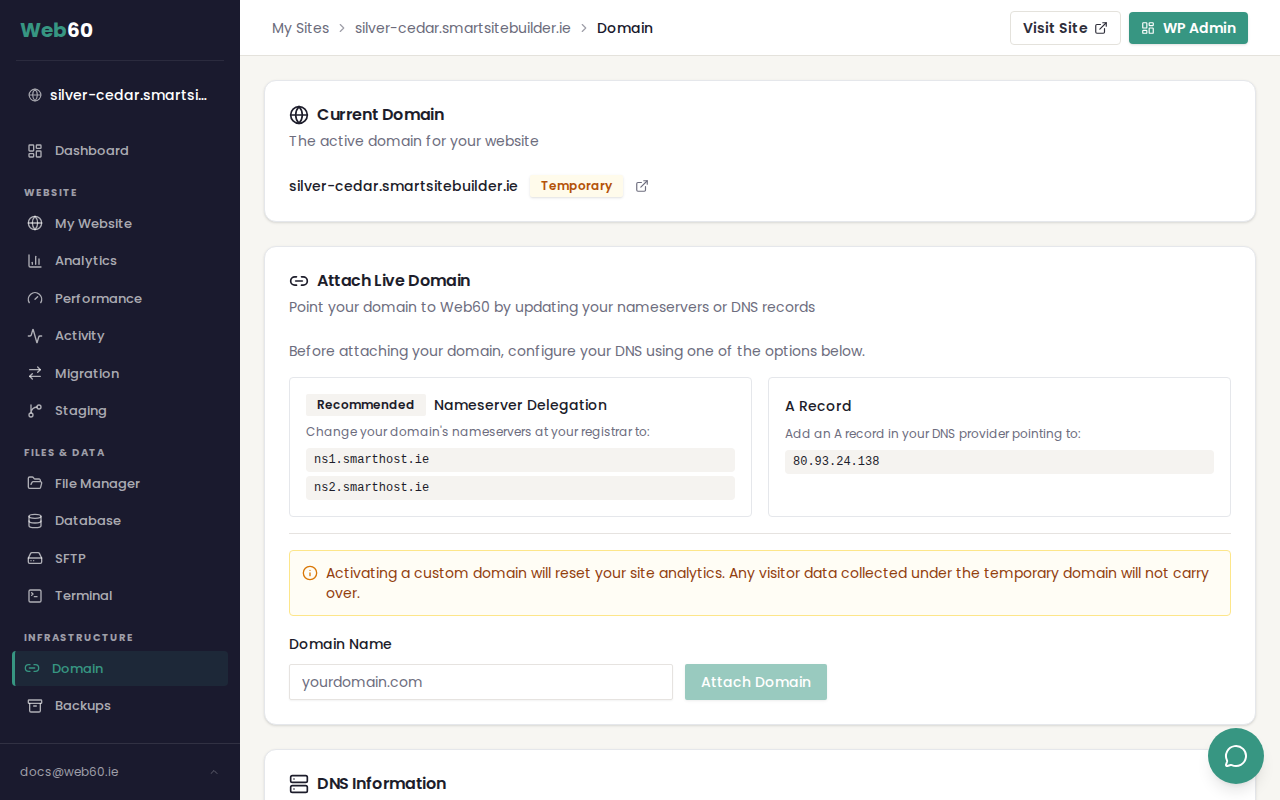
This notice appears just above the domain name input field so you are fully aware before making any changes.
Is this a problem?
For most customers, no. Here is why:
- Temporary domains get very little real traffic. Most visitors during the temporary phase are you and your team building the site, not real customers.
- The data that matters starts when you go live. Once your custom domain is active, every visitor is tracked and you will build up meaningful analytics from that point forward.
- A clean start is more useful. Starting fresh means your analytics reflect real visitor behaviour on your live website, without test traffic mixed in.
When do new analytics start?
Immediately. As soon as your custom domain is live and receiving visitors, analytics data begins recording. You will see your first data appear within minutes.
Tips for getting the most from your analytics after activation
- Check back after 24 hours. Give your site a day to collect some data before drawing any conclusions.
- Use the date range selector. Start with "Last 7 Days" to see early trends, then switch to longer periods as data builds up.
- Share your new URL. The sooner people start visiting your custom domain, the sooner you will have useful analytics to review.
For a full guide to understanding your visitor statistics, see Understanding your website visitor analytics.
Need help?
If you have any questions about your analytics after connecting a domain, visit our support page and we will be happy to help.
Frequently asked questions
Will I lose my analytics data when I connect my domain?
Yes. When you activate a custom domain, your analytics start fresh. Any visitor data collected under your temporary smartsitebuilder.ie address will not carry over to the new domain.
Can I keep my old analytics data?
No. Analytics are tied to the domain name, so when your domain changes the data cannot be transferred. However, most websites have very little meaningful traffic on the temporary domain, so this is rarely an issue.
When do my new analytics start recording?
Immediately. As soon as your custom domain is live, every visitor is tracked under the new domain. You will see data appear within minutes of your first visitor.
Last updated: 16 March 2026