

When you create your Web60 website, it is given a temporary web address straight away. This address lets you start building and previewing your site immediately, with no extra setup needed.
Your temporary address
Your temporary address looks something like this:
yoursite.smartsitebuilder.ie
This is a fully working web address. You can share it with anyone and they will be able to see your website. It is a great way to build and test your site before going live with your own domain name.
How to check your current address
You can see your current web address at any time in your Web60 dashboard.
- Sign in to your Web60 dashboard.
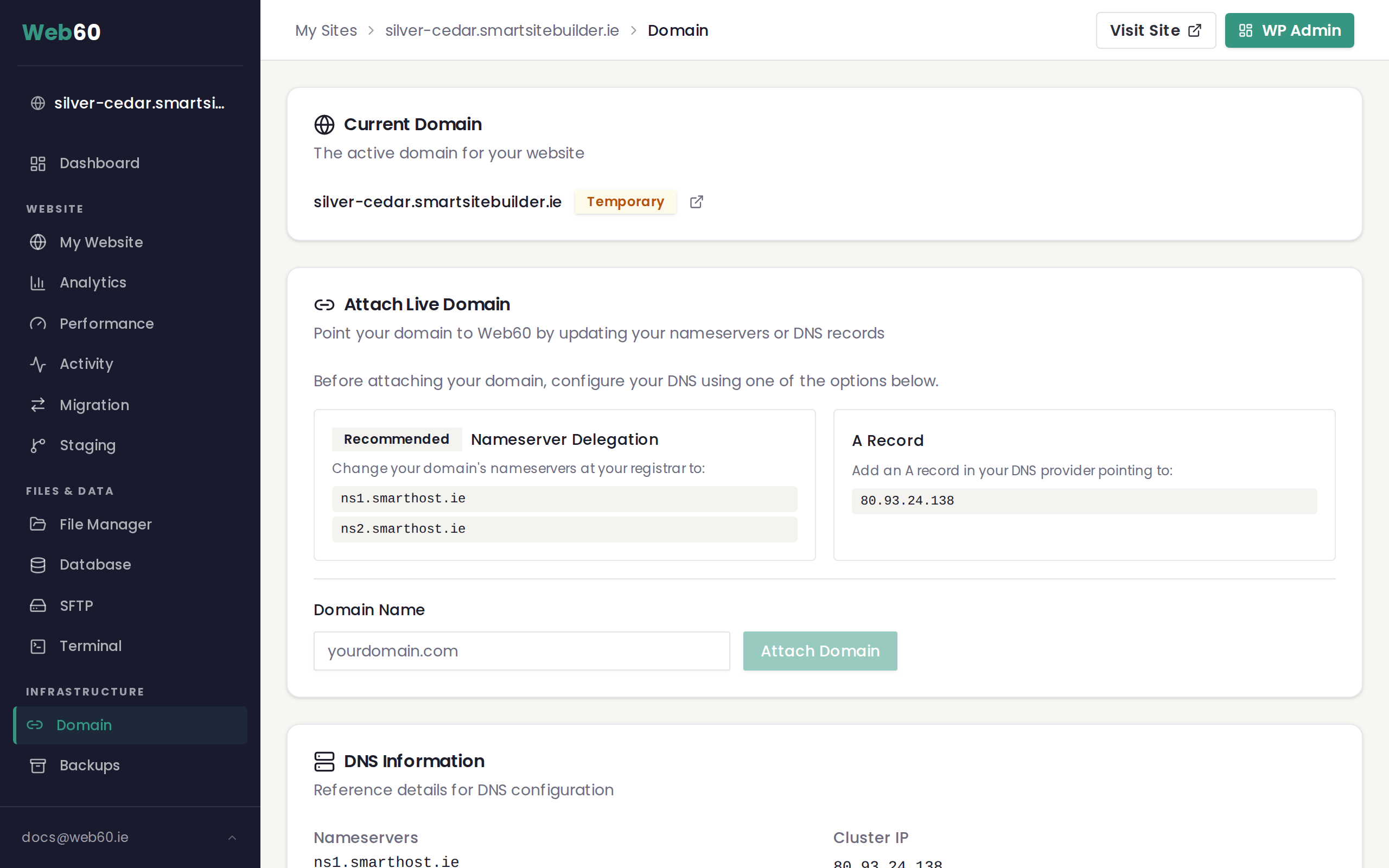
- Click "Domain" in the left-hand menu.
- Your current address is shown at the top of the page in the Current Domain card.
Next to your address, you will see a coloured badge:
- Temporary (amber badge) means your site is using its smartsitebuilder.ie address.
- Live (green badge) means your site is connected to your own custom domain.
What is a custom domain?
A custom domain is your own web address, like yourbusiness.ie or yourbusiness.com. It is what your customers will type into their browser to find you.
Using a custom domain gives your business a more professional appearance. Instead of yoursite.smartsitebuilder.ie, your visitors will see something clean and memorable like yourbusiness.ie.
When should I connect my own domain?
There is no rush. Many people prefer to finish building their site first, then connect their domain when everything looks the way they want it. Your temporary address will continue to work even after you connect a custom domain.
When you are ready to connect your own domain, follow our step-by-step guide on how to connect your domain.
Where do I get a domain name?
If you do not already own a domain name, you have two options:
- Register through Web60. You can register a domain during the setup process or from your Web60 dashboard. See our guide on registering a domain through Web60.
- Use a domain provider. You can buy a domain from any domain provider of your choice and then connect it to your Web60 site.
Need help?
If you have any questions about your web address or need a hand connecting your domain, visit our support page and we will be happy to help.
Frequently asked questions
What is my temporary web address?
When your site is first created, it gets an address like yoursite.smartsitebuilder.ie. This works straight away and lets you build your site before connecting your own domain.
Do I have to get my own domain?
No, your temporary address works perfectly well. But most businesses prefer a custom domain like yourbusiness.ie for a more professional look.
Can I change my temporary web address to something different?
The temporary address is assigned when your site is created and cannot be changed. However, once you connect your own custom domain, that is what visitors will see instead.
Last updated: 15 March 2026