

If something is not working as expected, or you simply have a question, the fastest way to get help is to raise a support ticket directly from your Web60 dashboard. Every ticket is reviewed by our team and you will receive a response within 4 business hours during Irish business hours.
Where to find the Support page
- Log in to your Web60 dashboard.
- Select the website you need help with.
- Click Support in the left-hand sidebar.
You will see the Raise a Ticket form at the top of the page, followed by a list of your recent tickets.
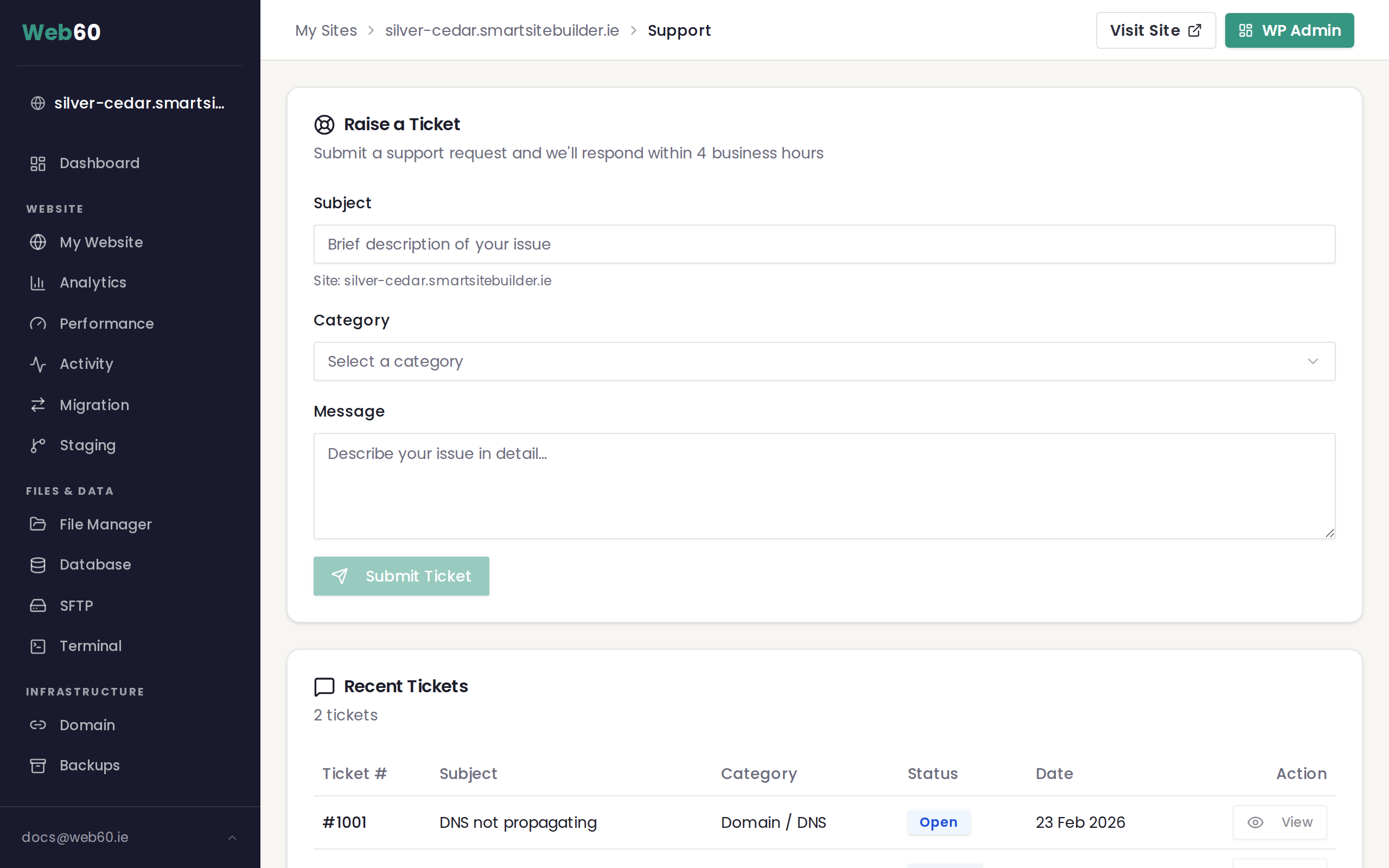
How to submit a support ticket
The ticket form has three fields:
- Subject - Write a short description of your issue. Be as specific as you can. For example, "Contact form not sending emails" is more helpful than "Something is broken."
- Category - Choose the category that best matches your issue from the dropdown. If you are not sure which one to pick, see our guide on choosing the right support category.
- Message - Describe the issue in detail. Include what you were trying to do, what you expected to happen, and what happened instead.
Once all three fields are filled in, click Submit Ticket. You will see a confirmation message and your ticket will appear in the Recent Tickets section below.
What information to include
The more detail you provide, the faster we can help. Try to include:
- The name or address of the affected website
- The steps you took before the problem appeared
- Any error messages you saw on screen
- A screenshot if the issue is something visual
- The browser you are using (Chrome, Safari, Firefox, etc.)
Response times
Our support team operates during Irish business hours, Monday to Friday, 9am to 5:30pm. We aim to respond to every ticket within 4 business hours. Tickets submitted over the weekend or on bank holidays will be picked up on the next working day.
Viewing your tickets
All of your support tickets are listed in the Recent Tickets section on the Support page. Each ticket shows:
- Ticket number for easy reference
- Subject you entered when creating the ticket
- Category you selected
- Status showing whether the ticket is Open or Closed
- Date the ticket was submitted
Before you raise a ticket
It is worth checking our knowledge base first. Many common questions are already answered there, and you may find a solution straight away. You can also use the search page to look for specific topics.
Need help?
If you have any questions about the support process, visit our support page and we will be happy to assist.
Frequently asked questions
How long does it take to get a response?
We respond to all support tickets within 4 business hours during Irish business hours (Monday to Friday, 9am to 5:30pm). Tickets submitted outside those hours will be answered the next working day.
Can I see my previous support tickets?
Yes. On the Support page in your Web60 dashboard, scroll down to the Recent Tickets section. You will see a list of all your tickets along with their status, category, and date.
What should I include in my support message?
Include a clear subject line, the name of the affected website, a description of what you expected to happen, and what actually happened. If the issue is visual, a screenshot is very helpful.
Last updated: 16 March 2026