

If you turned on Basic Auth (password protection) for your website and now you cannot get past the login prompt, do not worry. Your Web60 dashboard is not affected, and you can fix this in a few minutes.
What happened
Basic Auth adds a username and password prompt that appears before anyone can view your website. If you enabled it but did not save the credentials, forgot the password, or entered the wrong details, you will be locked out of viewing your website.
Important: This only affects your public website. Your Web60 dashboard at app.web60.ie uses a completely separate login and is not affected by Basic Auth.
How to find your credentials
- Sign in to your Web60 dashboard at app.web60.ie/login.
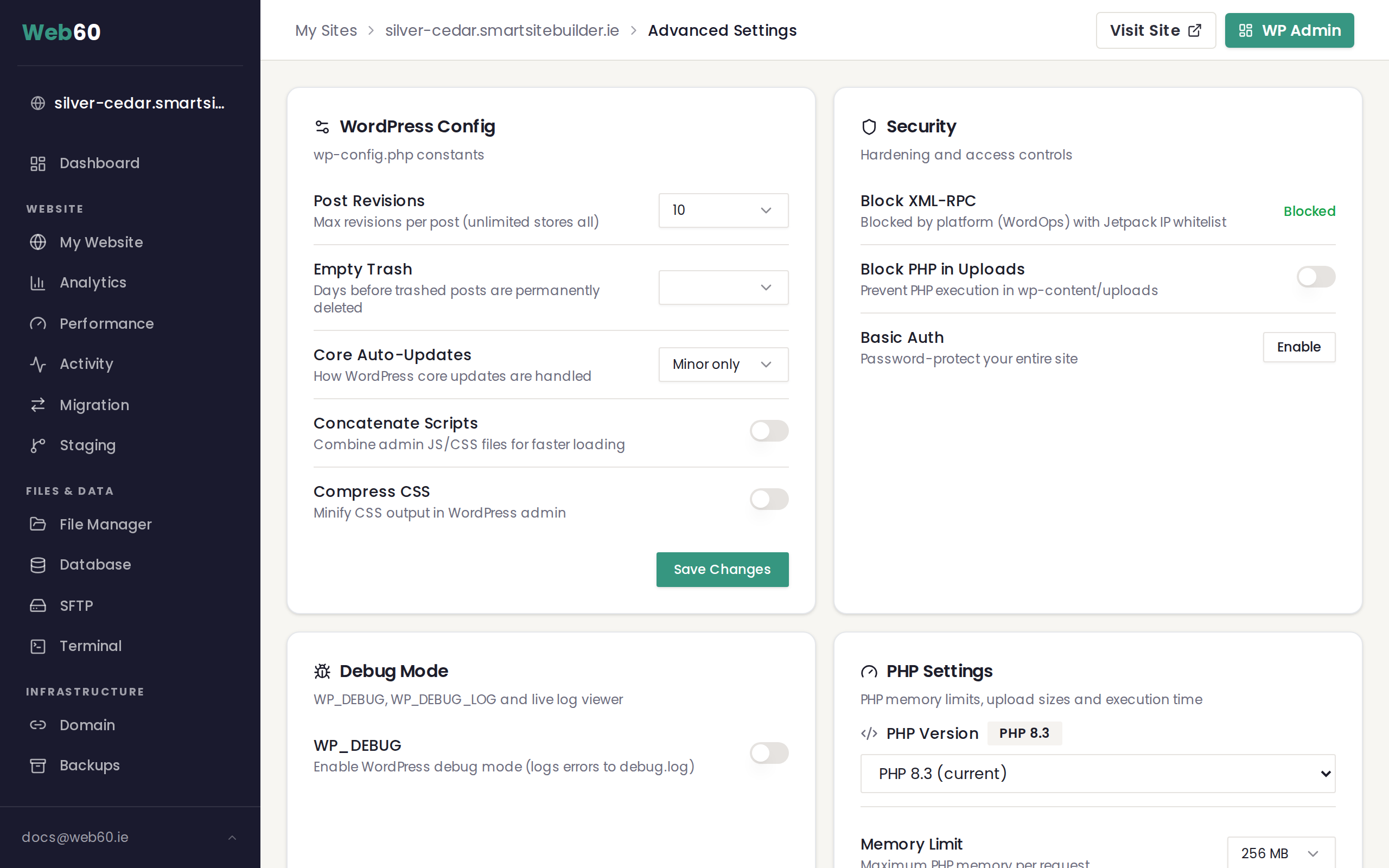
- Click My Website in the sidebar.
- Go to Advanced Settings, then Security.
- Find the Basic Auth section.
- Your username will be displayed. If you have forgotten the password, look for the Reset Password option to generate a new one.
- Use these credentials when your website asks for a username and password.
How to disable Basic Auth
If you no longer need password protection on your website, you can turn it off entirely.
- Sign in to your Web60 dashboard.
- Go to My Website, then Advanced Settings, then Security.
- Find the Basic Auth setting and turn it off.
- Save the change.
Your website will become publicly accessible again straight away.
A warning about live websites
Basic Auth is useful for hiding your website while it is under construction or during development. However, if your website is live and receiving visitors, enabling Basic Auth will block everyone from seeing it.
Before enabling Basic Auth on a live website, make sure this is what you intend. If you only want to protect a specific page, consider using WordPress's built-in page visibility settings instead of Basic Auth.
If you are still locked out
If you have tried the steps above and still cannot access your website, there may be a browser caching issue. Try the following:
- Open your website in a private or incognito browser window.
- Clear your browser's cache and cookies for your website's domain.
- Try a different browser entirely.
Need help?
If you are still unable to access your website after trying these steps, visit our support page and we will get you back in.
Frequently asked questions
Can I still access my Web60 dashboard if Basic Auth is enabled?
Yes. Basic Auth only protects your public website. Your Web60 dashboard login at app.web60.ie is completely separate and is not affected by the Basic Auth setting.
What is the username for Basic Auth?
The username and password for Basic Auth are shown in your Web60 dashboard under Advanced Settings, then Security. If you do not remember the password, you can reset it from the same page.
Will disabling Basic Auth make my website public again?
Yes. When you turn off Basic Auth, anyone can view your website without entering a username and password. Only disable it when you are ready for your website to be publicly accessible.
Last updated: 16 March 2026