

After the AI processes your choices, you'll see six unique website designs, each already showing your business name and real content, not placeholder text.
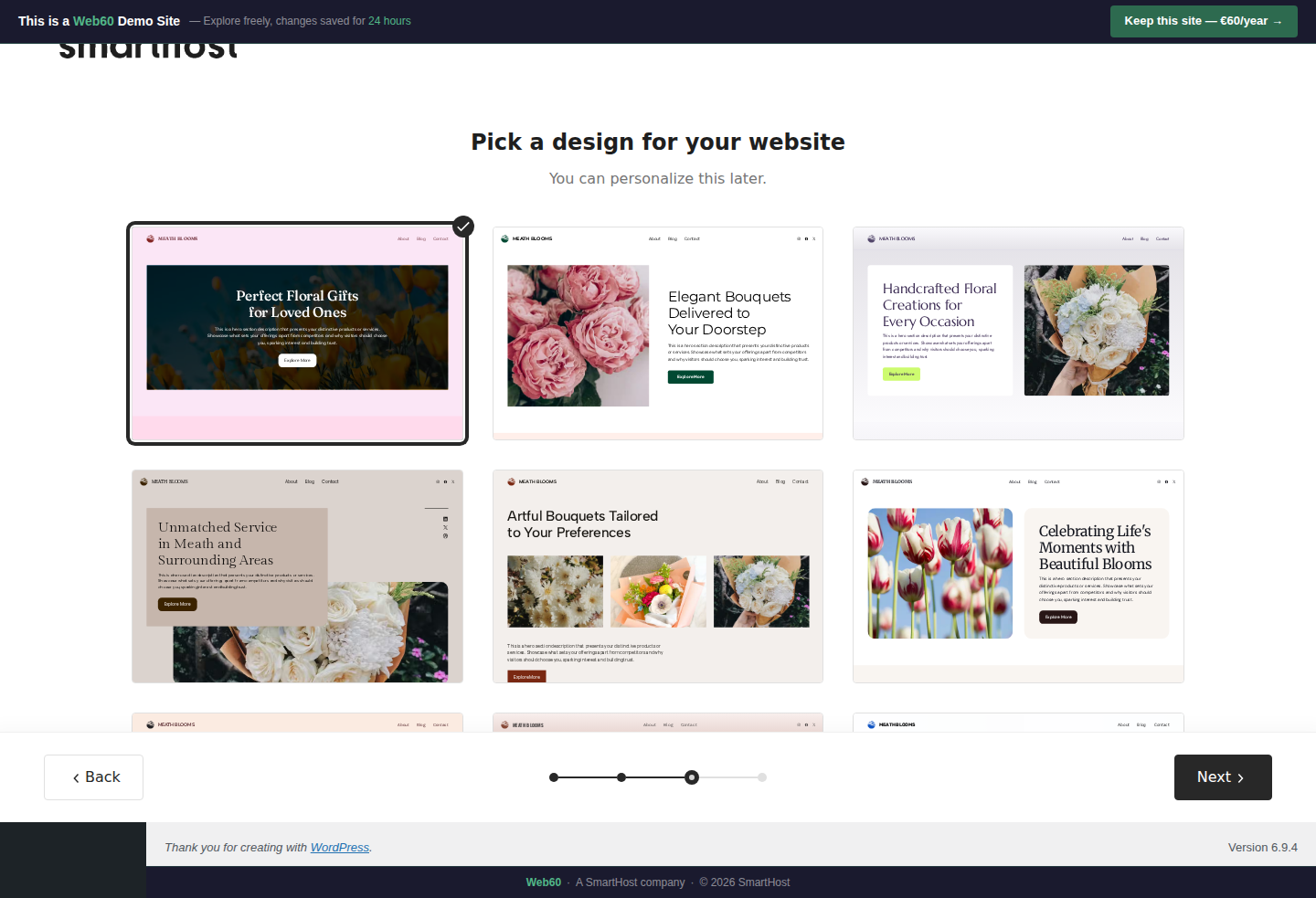
What each design card shows
Each card is a miniature preview of your homepage. Look at:
- How your business name appears in the header
- The hero section headline and imagery
- The overall colour scheme
- Whether the layout is image-heavy or text-heavy
Click Preview on any card to see a larger view.
What varies between designs
- Layout. Some lead with large images, others with text.
- Colour emphasis. Shades and accent colours vary.
- Content blocks. The number and arrangement of sections differs.
- Typography. Heading sizes and weights vary subtly.
How to choose
There is no wrong choice. All six designs use your actual content and colour palette. Pick the one that best matches how you want customers to feel when they visit.
You can customise everything after generation. Your design choice is the starting structure, not a permanent commitment.
Frequently asked questions
Can I change my design after the wizard?
Yes. Everything can be edited: layout, colours, fonts, and content. Your design choice is a starting point.
What if none of the designs look right?
Choose the closest one and customise it after. Or start the wizard over with a different business description for different results.
Last updated: 19 March 2026